Tour

Every view, in light and dark.

Each image below is a real capture of Envoy running locally against a made-up company, StrataForge Robotics. The deals, accounts, people, and numbers are fictional, and nothing was sent anywhere to take them. Switch the site theme and the screenshots follow.

Envoy is in development and is not open to customers yet. Quotes and the fleet integrations are not shown, because no screen in the app uses them.

Illustration: a single metal relay baton lying across a white painted line on dark rubberized ground, stadium floodlights glowing far behind.

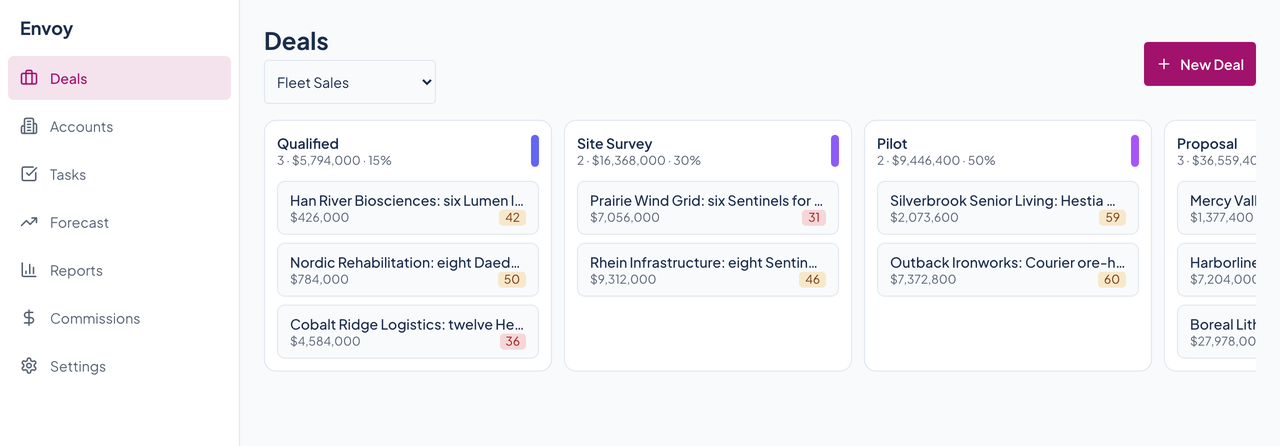
Deals: Fleet Sales

Envoy's Deals board for the Fleet Sales pipeline, with stage columns from Qualified to Closed Won and deal cards showing amounts and health scores.Envoy's Deals board for the Fleet Sales pipeline, with stage columns from Qualified to Closed Won and deal cards showing amounts and health scores.
The main board. Seven stages from Qualified to Closed Lost, each column showing its deal count, total value, and probability, and each card showing the deal's amount and a colored health score. Scroll sideways for the rest of the stages. Enlarge to see the full screen.

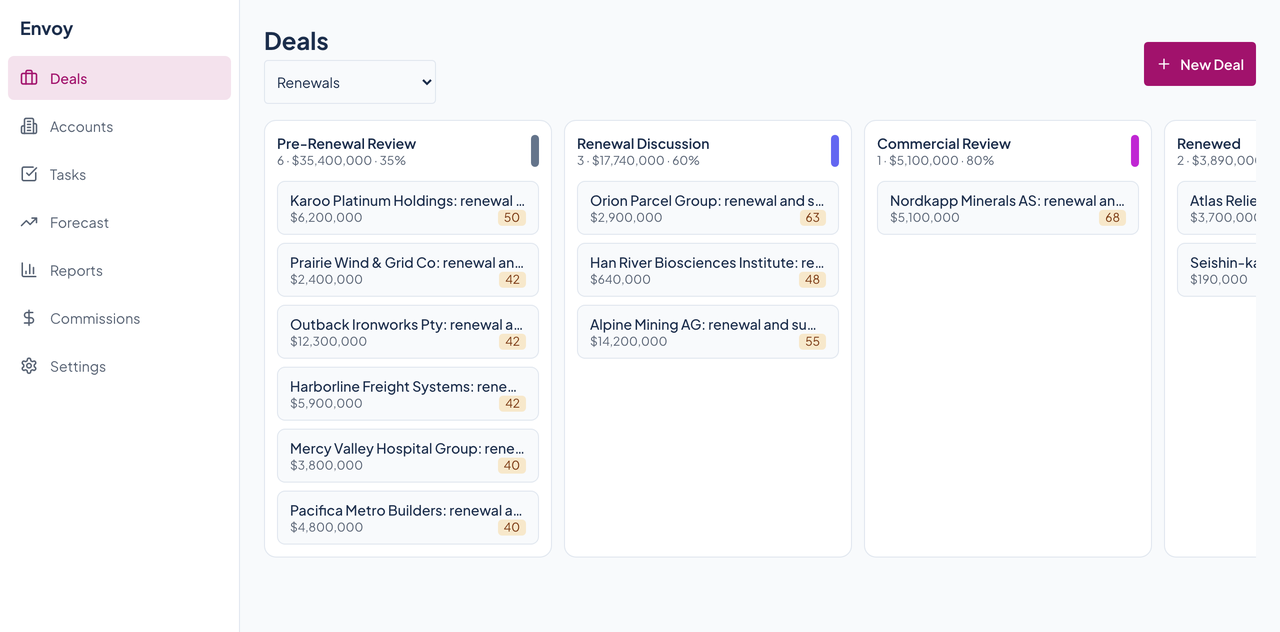
Deals: Renewals

Envoy's Deals board for the Renewals pipeline, with five stage columns and renewal deal cards.Envoy's Deals board for the Renewals pipeline, with five stage columns and renewal deal cards.
A second pipeline with its own stages: Pre-Renewal Review, Renewal Discussion, Commercial Review, Renewed, and Churned. The selector at the top switches pipelines. Enlarge to see the full screen.

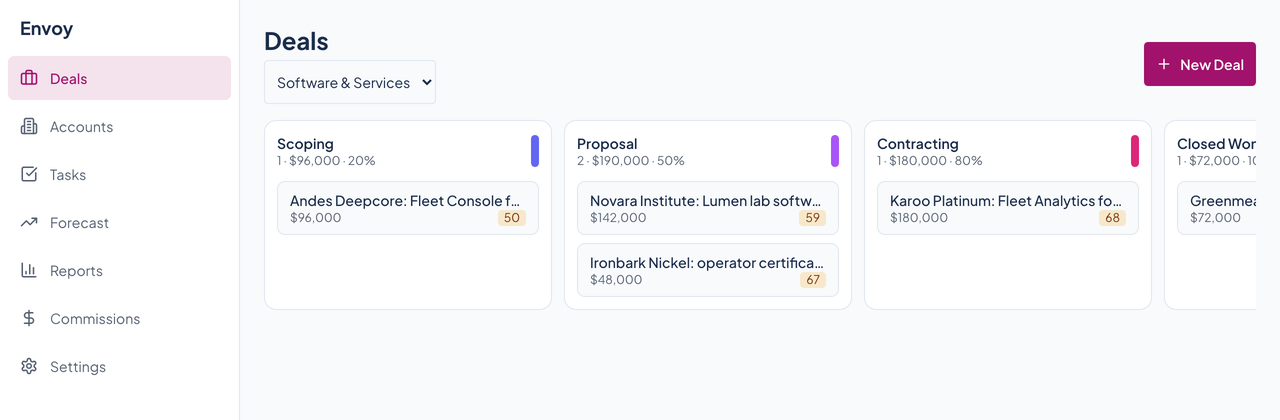
Deals: Software and Services

Envoy's Deals board for the Software and Services pipeline, with its own stage columns.Envoy's Deals board for the Software and Services pipeline, with its own stage columns.
A third pipeline, for services work, with five stages of its own. Enlarge to see the full screen.

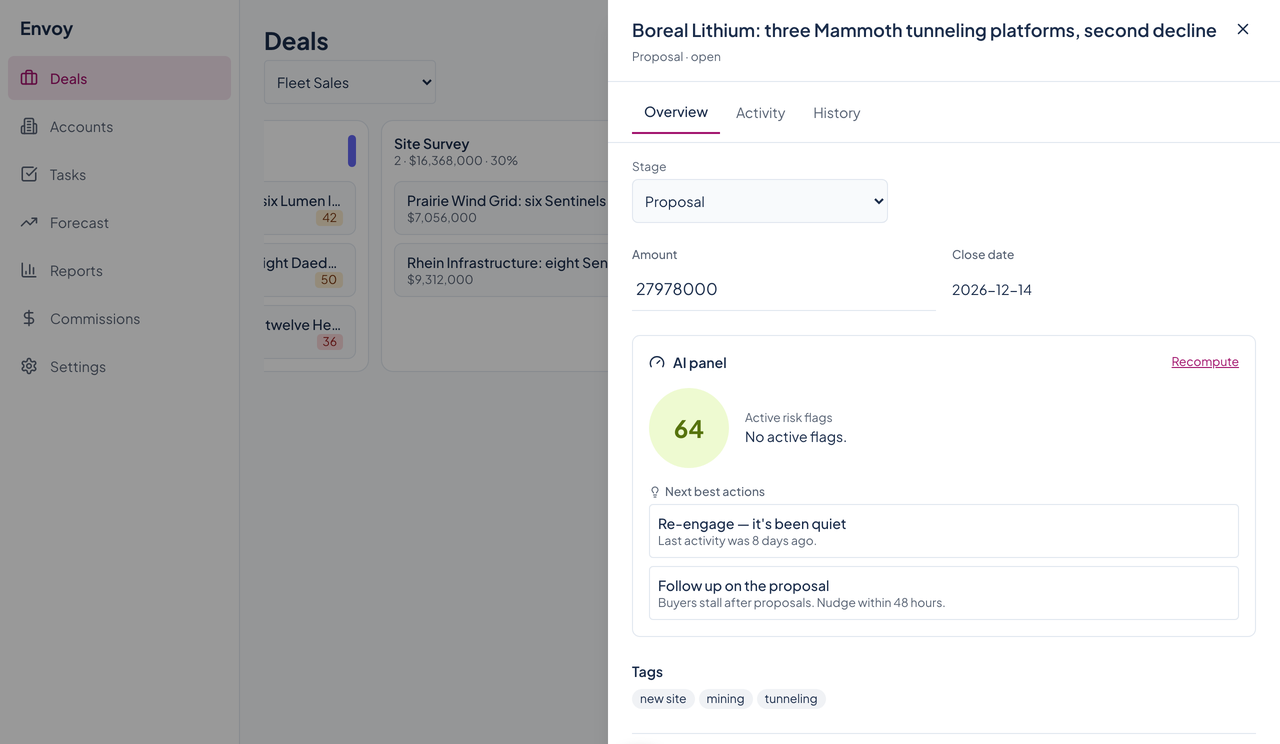
A deal's drawer

Envoy's deal drawer for a Boreal Lithium deal with a health score of 72, no active flags, two next best actions, and tags.Envoy's deal drawer for a Boreal Lithium deal with a health score of 72, no active flags, two next best actions, and tags.
Click a card and the drawer slides in. Overview shows the amount and close date, the health panel with the score, any active risk flags, and the next best actions, then the deal's tags. Enlarge to see the full screen.

A deal at risk

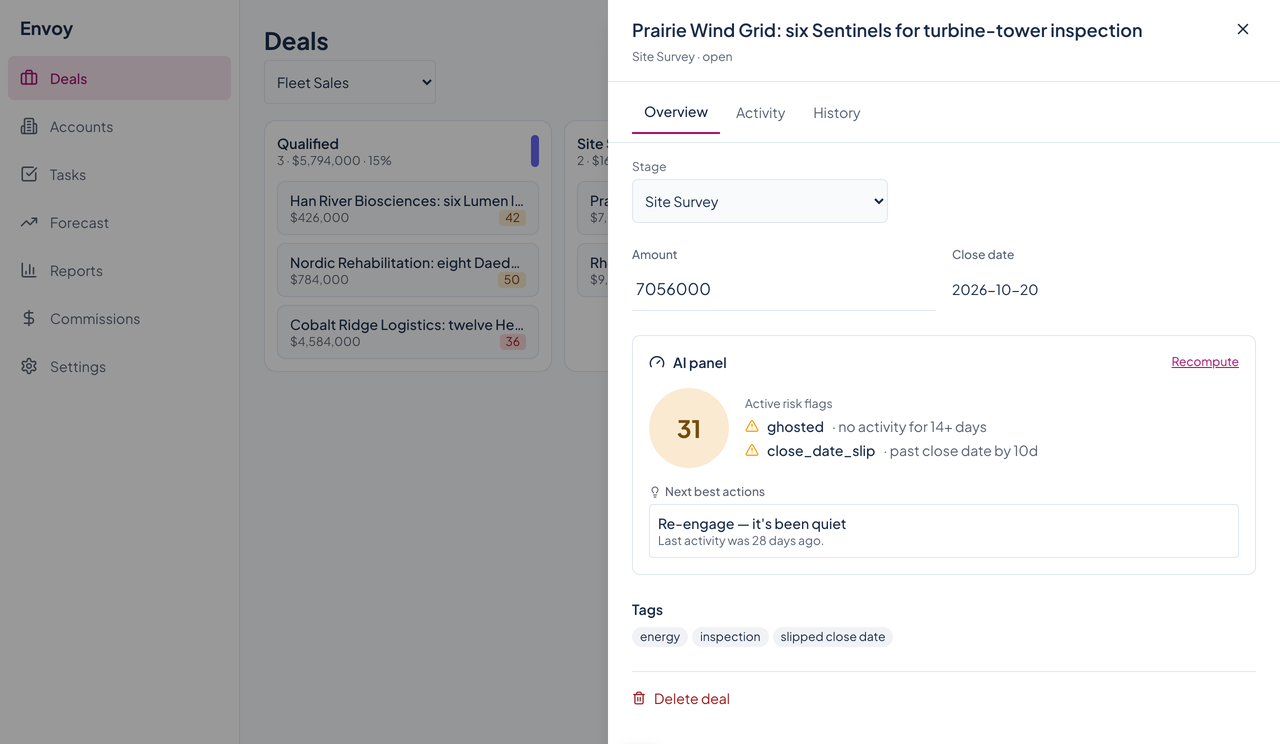
Envoy's deal drawer for a Prairie Wind Grid deal with a health score of 31, ghosted and close date slip flags, and a re-engage suggestion.Envoy's deal drawer for a Prairie Wind Grid deal with a health score of 31, ghosted and close date slip flags, and a re-engage suggestion.
The same panel on a deal that has gone quiet: a score of 31, two risk flags with the reason for each, and a suggestion to re-engage. The panel is labeled AI in the app; the score, flags, and suggestion come from fixed rules, explained on the scoring page. Enlarge to see the full screen.

The activity timeline

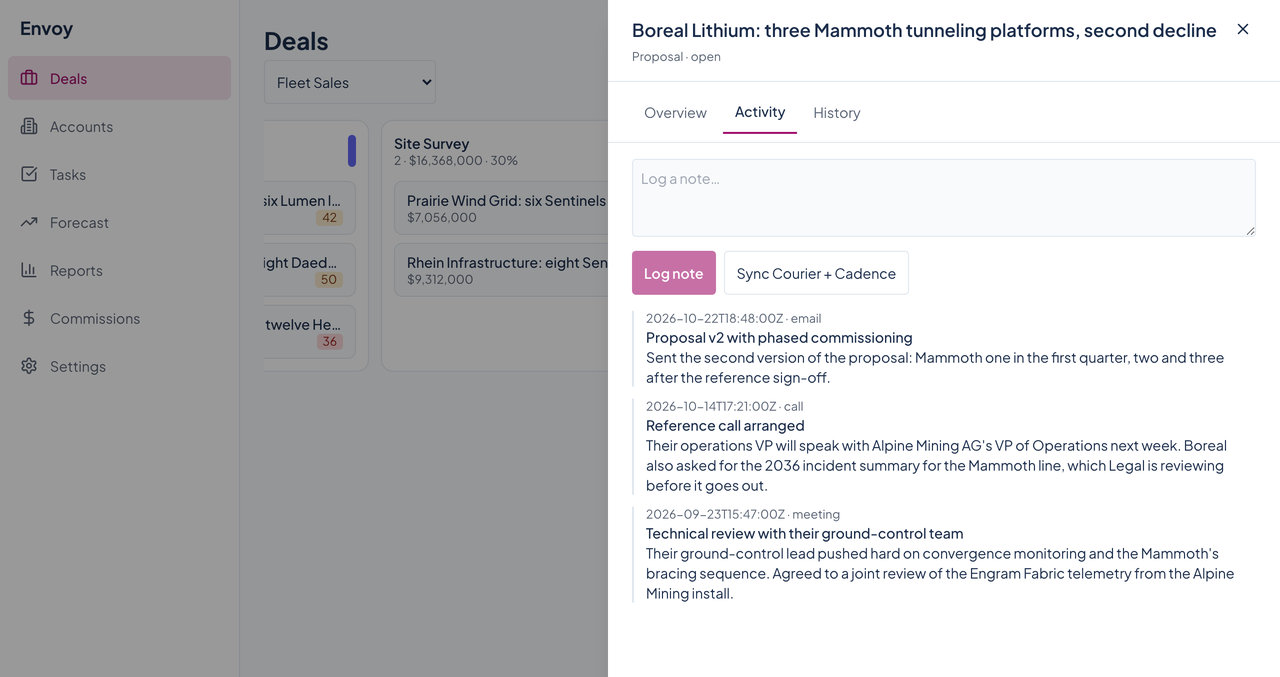
Envoy's deal drawer on the Activity tab, with a note box, a log button, and three logged activities: an email, a call, and a meeting.Envoy's deal drawer on the Activity tab, with a note box, a log button, and three logged activities: an email, a call, and a meeting.
Type a note and log it, or press Sync Courier and Cadence to pull in messages and meetings. Emails, calls, and meetings appear newest first with their dates. The sync button reads built-in sample data today. Enlarge to see the full screen.

A deal's history

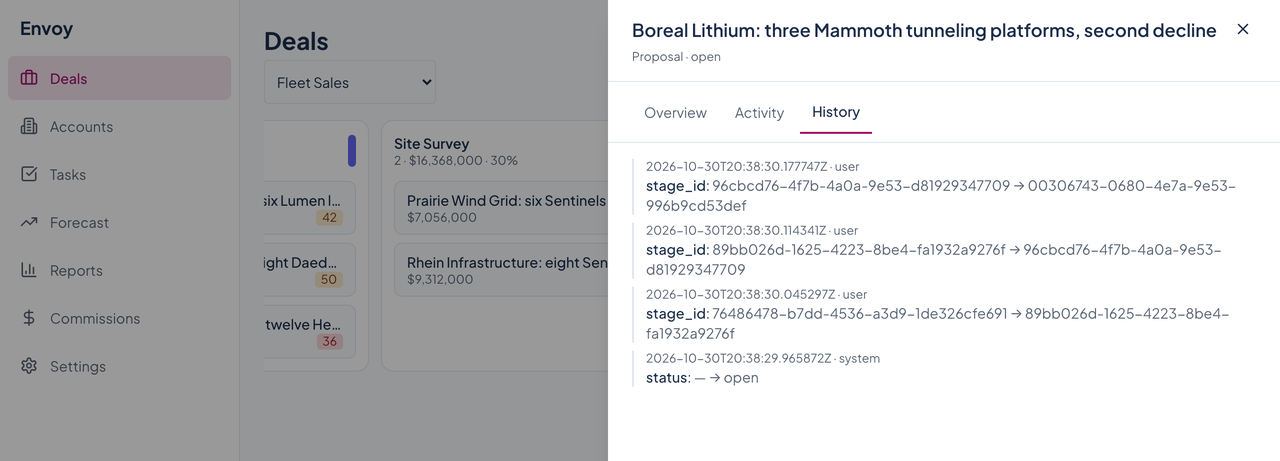
Envoy's deal drawer on the History tab, listing stage changes and a status change with timestamps.Envoy's deal drawer on the History tab, listing stage changes and a status change with timestamps.
Every change to the deal, with the time and who or what made it. Stage changes print the stage ids today, not the stage names. Enlarge to see the full screen.

Accounts

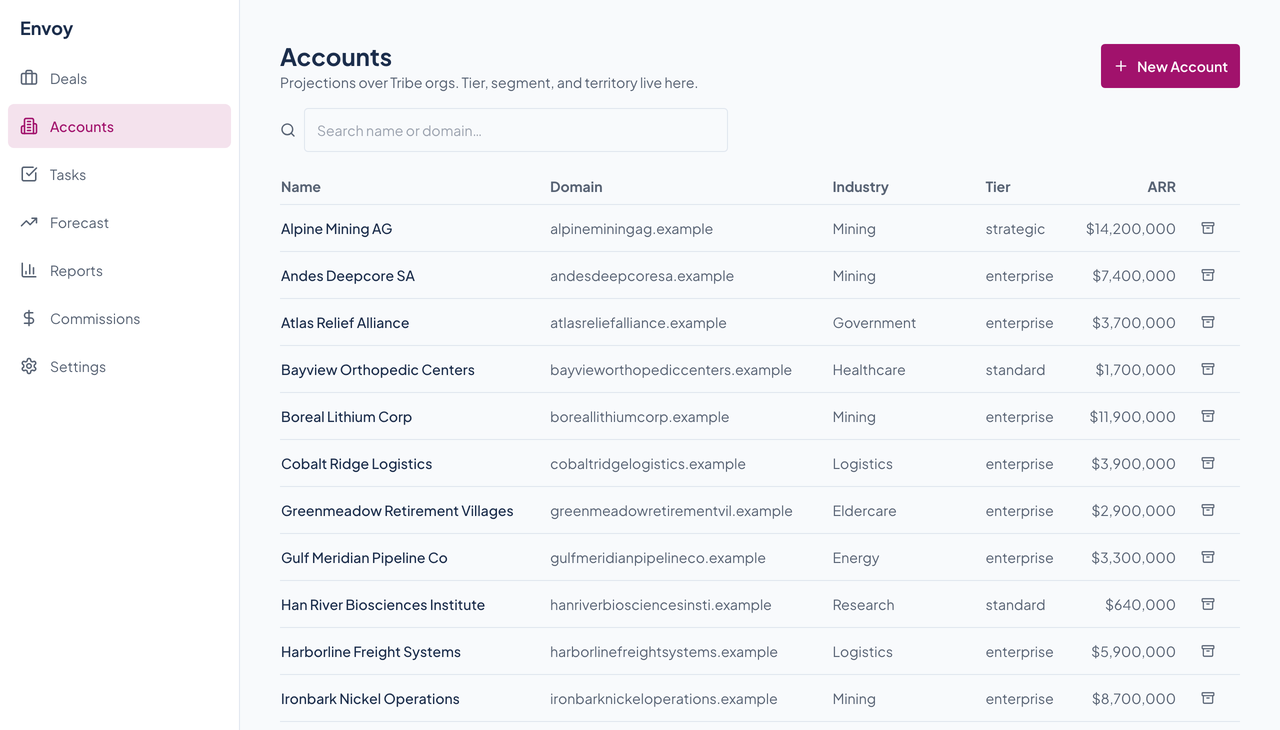
Envoy's Accounts table with name, domain, industry, tier, and ARR columns, a search box, and a New Account button.Envoy's Accounts table with name, domain, industry, tier, and ARR columns, a search box, and a New Account button.
Name, domain, industry, tier, and ARR for each account, with search, an archive button on each row, and a New Account button. Enlarge to see the full screen.

Tasks

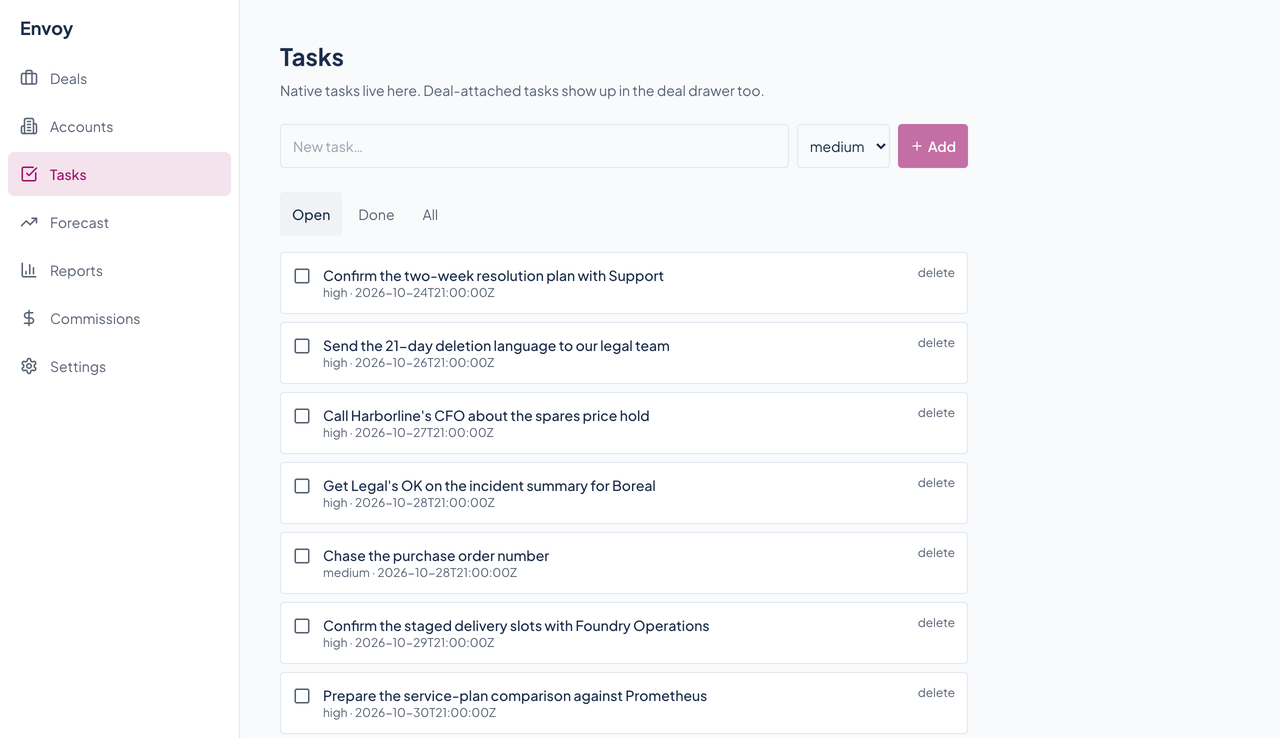
Envoy's Tasks page with an add-task box, a priority menu, filter tabs, and a list of open tasks with due dates.Envoy's Tasks page with an add-task box, a priority menu, filter tabs, and a list of open tasks with due dates.
A plain list of tasks with a priority, a due date, and an open, done, or all filter. Add one with the box at the top. Enlarge to see the full screen.

Forecast

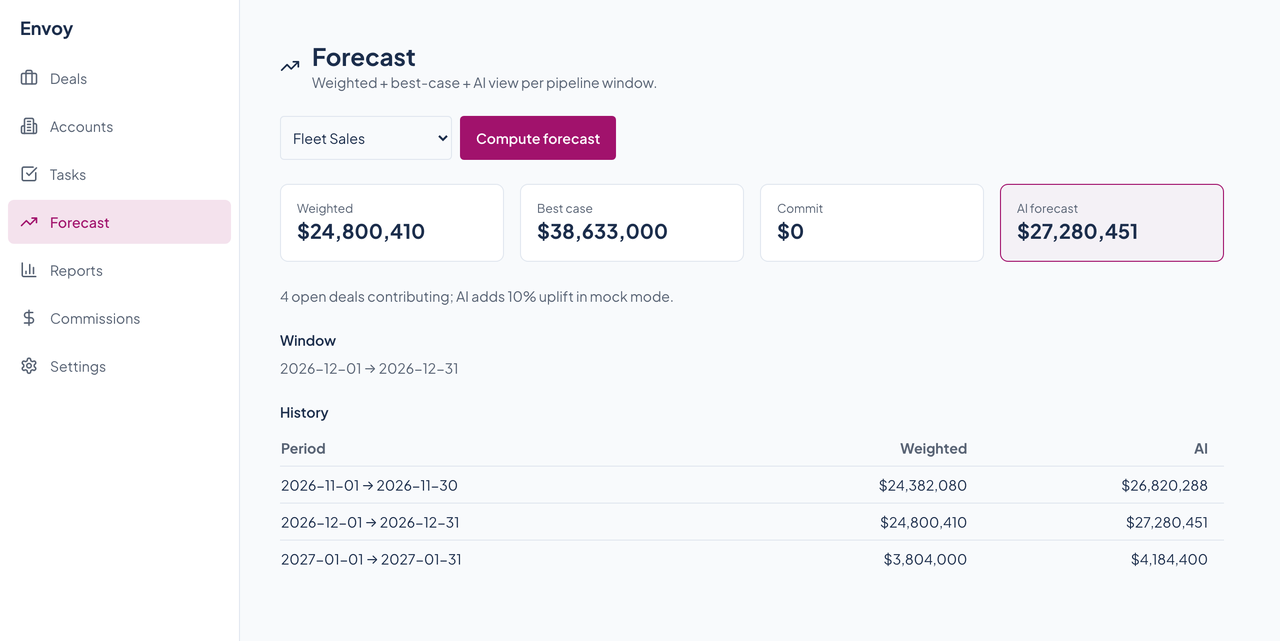
Envoy's Forecast page for Fleet Sales with weighted, best case, commit, and AI forecast cards and a table of three earlier windows.Envoy's Forecast page for Fleet Sales with weighted, best case, commit, and AI forecast cards and a table of three earlier windows.
Weighted, best case, commit, and the AI forecast for a window, with a history of earlier windows. The AI forecast is the weighted number times 1.1, and the page says so. Press Compute forecast to compute the current month; this capture was taken with the browser's date set to mid-December 2026 so the window holds the sample deals. Enlarge to see the full screen.

Reports

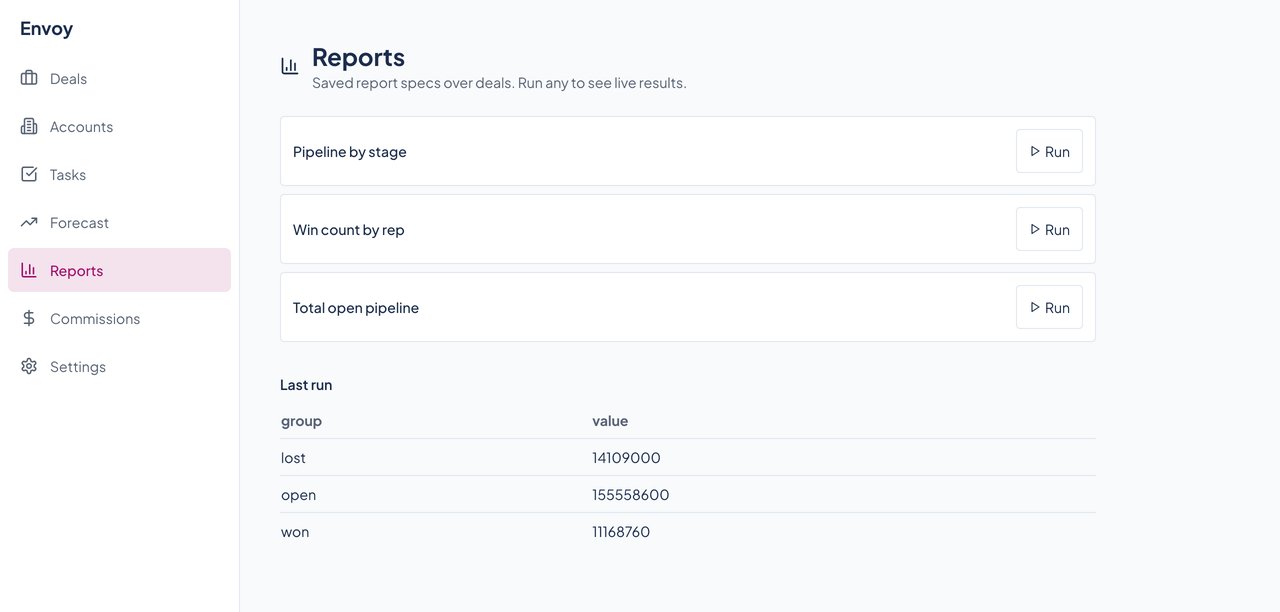
Envoy's Reports page listing three saved reports, Pipeline by stage, Win count by rep, and Total open pipeline, each with a Run button, and the last run's results.Envoy's Reports page listing three saved reports, Pipeline by stage, Win count by rep, and Total open pipeline, each with a Run button, and the last run's results.
Saved report specs over deals. Press Run and the results appear below: here, the total of lost, open, and won deals. Enlarge to see the full screen.

Settings

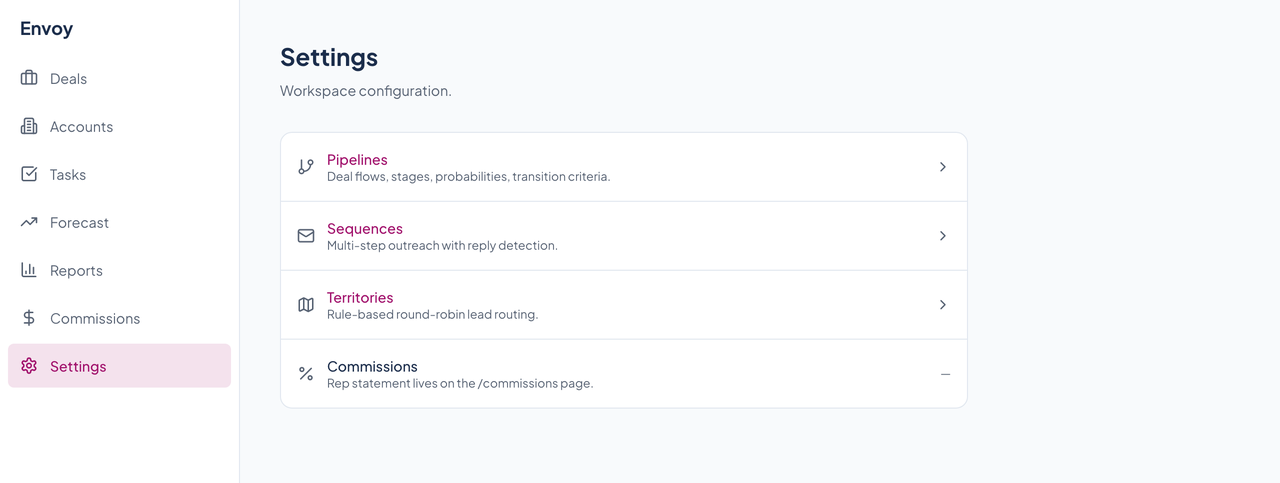
Envoy's Settings page with rows for Pipelines, Sequences, and Territories, and a grayed-out Commissions row.Envoy's Settings page with rows for Pipelines, Sequences, and Territories, and a grayed-out Commissions row.
Pipelines, Sequences, and Territories each open their own page. A fourth row, Commissions, is grayed out and points to the Commissions page. Enlarge to see the full screen.

Settings: pipelines and stages

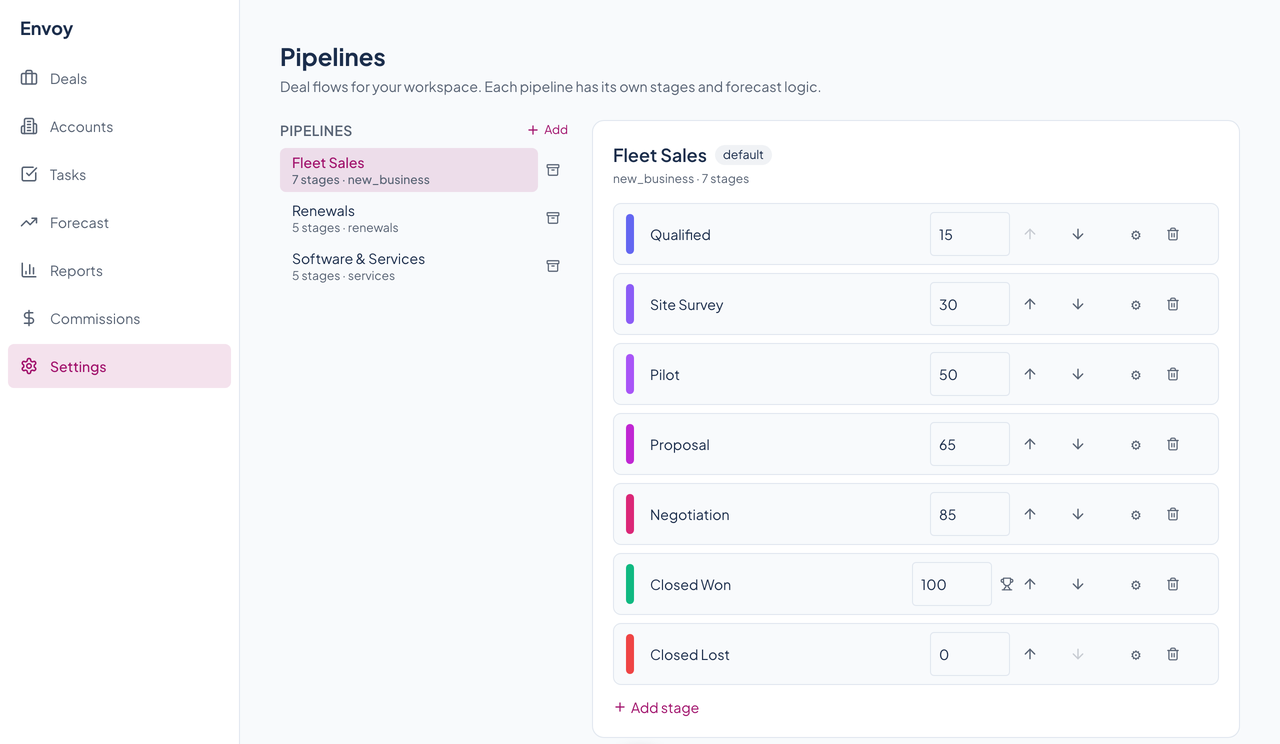
Envoy's pipeline settings for Fleet Sales, listing seven stages with editable probabilities, arrows to reorder, and criteria and delete buttons.Envoy's pipeline settings for Fleet Sales, listing seven stages with editable probabilities, arrows to reorder, and criteria and delete buttons.
Add, rename, and reorder stages, set each stage's probability, and open a stage's entry and exit criteria. The seven stages of Fleet Sales are shown. Enlarge to see the full screen.

Settings: sequences

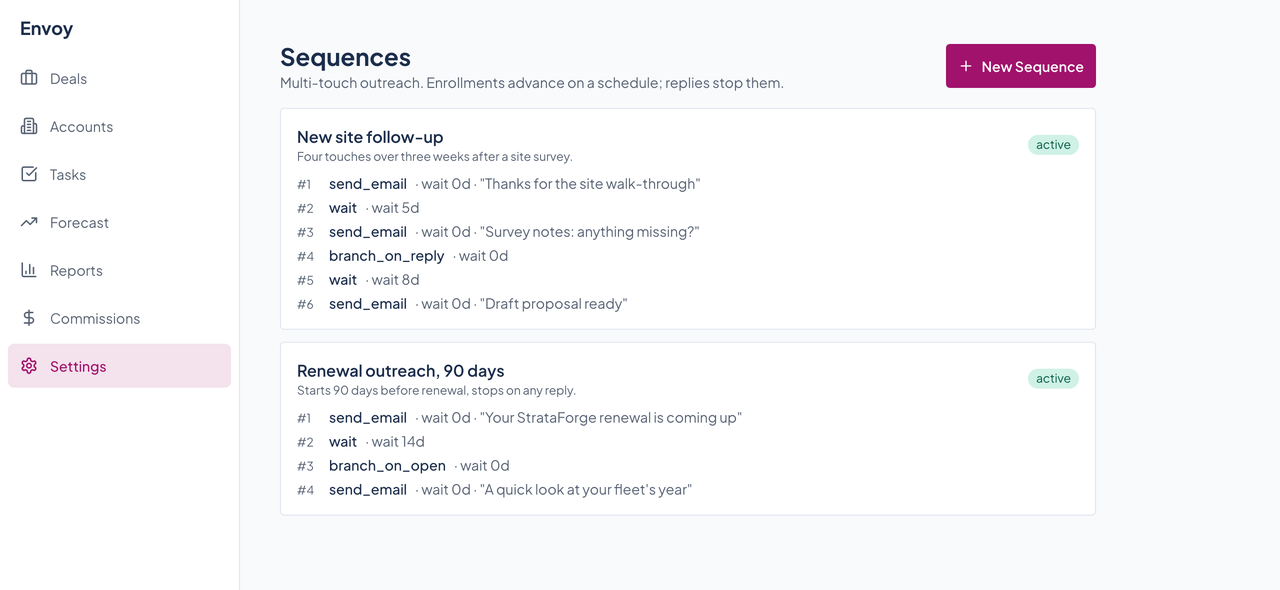
Envoy's sequences settings with two active sequences, a site follow-up with six steps and a renewal outreach with four.Envoy's sequences settings with two active sequences, a site follow-up with six steps and a renewal outreach with four.
Multi-step outreach: send an email, wait some days, branch on a reply or an open. Enrolled contacts move through the steps on a schedule, and a reply stops the sequence. Enlarge to see the full screen.

Settings: territories

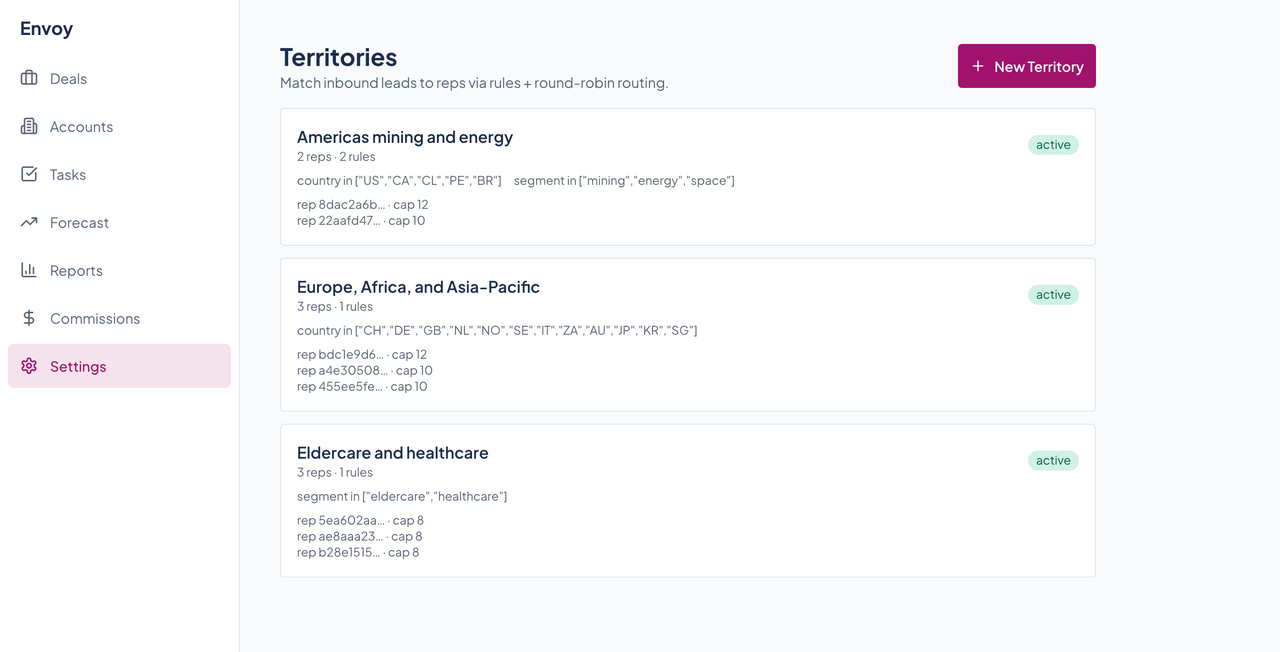
Envoy's territories settings with three active territories, each with its rules and a list of reps and capacities.Envoy's territories settings with three active territories, each with its rules and a list of reps and capacities.
Rules that match an inbound lead to a territory, and the reps in each one with a capacity. Reps appear as ids today. Enlarge to see the full screen.